The Today page and day sheets
The salon's day at a glance: appointments, who's in, takings, tomorrow, what's next and closing off the day, plus printed and emailed day sheets.
The Today page is the salon's day at a glance: how many are booked, who's in the chair, the day's takings so far, and anything that needs a look, like booking requests or replies from clients. At the end of the day it's where you close off any appointment that wasn't checked out.
What's on the Today page
Choose Today in the menu. It greets you and shows the date, with New sale and New appointment buttons. It refreshes itself every minute, and says when it last did ("Updated 10:32am").
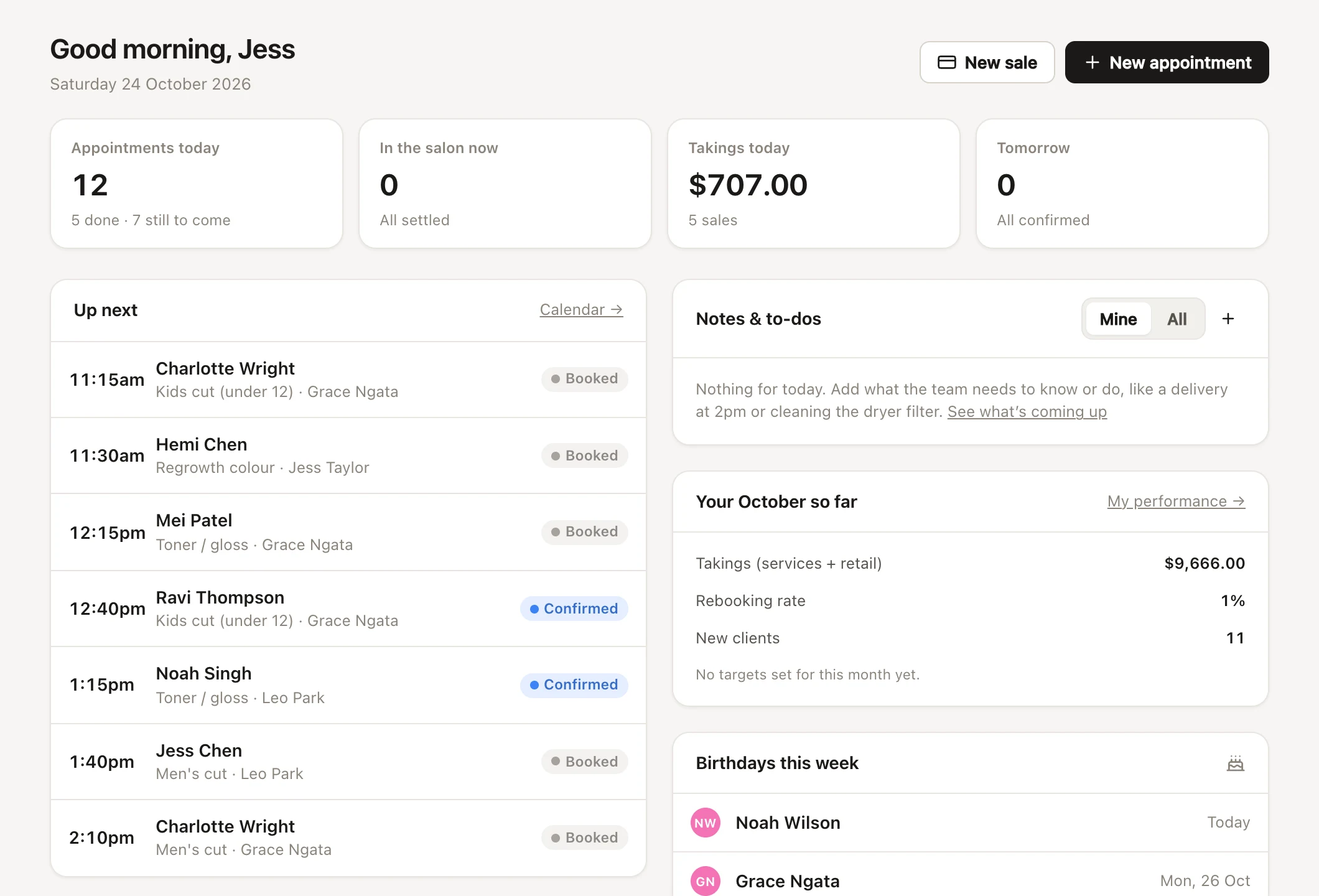
Four tiles sit across the top:
| Tile | What it shows | Click it to |
|---|---|---|
| Appointments today | Today's appointments (not counting cancellations), with how many are done and how many are still to come | Open the calendar |
| In the salon now | Clients checked in or in progress, and how many are waiting to pay ("All settled" when none are) | Open Not checked out, when there are any |
| Takings today | Today's revenue, as the Overview counts it, and how many sales | Open the cash-up |
| Tomorrow | Tomorrow's appointments, and how many aren't confirmed yet ("All confirmed" when they all are) | Open tomorrow on the calendar |
Only people with "See reports for the whole salon" see Takings today, which leaves out tips, gift vouchers sold (they count when they're spent) and any tax added on top of your prices. Someone with only "See their own takings and targets" sees Your takings today: their own services and products today, and how many sales they're from. Anyone else doesn't see the tile. On a Front desk device, the salon's takings are held back like its reports: a PIN sign-in shows Your takings today instead, until the person unlocks full access.
Once nobody's in and nobody's still to come, but some appointments haven't been checked out, In the salon now becomes Not checked out: see closing off the day.
Messages and alerts on the Today page
Under the tiles, the Today page tells you when something needs doing:
- Online booking requests waiting to be approved, with Answer. See approving online bookings first.
- New messages from clients (text replies, and requests to change or cancel from their booking link), with Read. See replies.
- Texts running low for the month or the free trial, with Plan & billing, and messages that failed to send this week, with View. These two are for people who can "Connect Stripe and SMS, and change payment settings".
- How many clients are on the waitlist, with Find them a time. See the waitlist.
Up next and recent online bookings
Up next lists today's appointments from the current hour on that are still going ahead: the time, the client (with a warning sign for a client alert), the services, the team member and the status. Click one to open it on the calendar. When there's nothing left, it says "Nothing else booked for today."
Recent online bookings lists the last six appointments booked on your booking page, with when they were made. Before any come in, it shows your booking page's address to share.
Notes, targets, birthdays and stock on the Today page
The right side of the Today page has:
- Notes & to-dos: anything overdue, then today's, to tick off right there, with + to add one and Coming up → for the rest. People who can see everyone's notes choose Mine or All. See notes and to-dos.
- Your week so far (or your month): your own takings against your targets, for team members who take appointments and can "See their own takings and targets". See my performance and pay.
- Birthdays this week: clients with a birthday in the next seven days. Click one for their profile.
- Running low: products at or below their low-stock level, or marked Needs a count when the count has gone below zero. See products and stock levels.
Closing off the day: appointments not checked out
At the end of the day, every appointment should be checked out, marked a no-show, or marked done, so the day's takings, reports and cash-up are right.
- On the Today page, click Not checked out ("Close off the day →"). During the day, clicking In the salon now opens the same list.
- It lists today's appointments that have finished but haven't been checked out: the time, client, services, team member and total.
- For each one, press Checkout, or use ⋯ to choose Mark as a no-show or Done, no charge (completed, without a sale).
Each change has Undo. When everything's done, it says "All checked out". Without "Book and change other team members’ appointments", the list shows only appointments that are all yours.
Printing a day sheet from the calendar
To print the day, open it on the calendar and choose ⋯ → Print day sheet. It prints the calendar as it's showing, so choose who's on it with Team first, and Compact, Comfortable or Spacious under ⋯ to change how much fits on a page. The week view prints the same way.
Getting your day sheet by email each morning
A day sheet by email lists your appointments for the day, with any booking requests, blocked time, and the day's notes and to-dos for you and the whole salon. It's a handy backup if the internet goes down.
- Turn it on for yourself in Settings → My account: Email me my day each morning. It needs an email address on your profile.
- See, print or email my day opens My day for any date, with Print and Email it to me.
- Nothing comes on a day when you have nothing booked and no notes or to-dos just for you.
Whether the team gets one to start with, and what time they're sent (7am to start with), are under Settings → Team alerts. See team alerts and my account.
Common questions
Why does the Today page say an appointment isn't checked out?
It finished without a sale. Check it out, or mark it a no-show or Done, no charge under Not checked out, so your takings and cash-up add up.
What's the difference between Done, no charge and checking out?
Done, no charge marks the appointment completed with no sale, for a free fix-up, say. Checking out records what was paid.
Why don't I see the texts warning on the Today page?
It's only shown to people who can "Connect Stripe and SMS, and change payment settings".
Can I print just one stylist's day?
Yes. Hide everyone else under Team on the calendar, or open their week, then choose ⋯ → Print day sheet. Each person can also print their own from Settings → My account → See, print or email my day.