# Cashing up the till at the end of the day
> See the day's takings by payment method, count the till by notes and coins or as a total, and check it balances against the float, cash taken and petty cash.
Source: https://docs.fullcolumn.com/sales/cash-up
The cash-up is your end-of-day check: what the salon took, by payment method, and whether the cash in the till matches what should be there. Count the till by notes and coins (or enter a total), and FullColumn tells you straight away if it's spot on, over or short. Each day's count is saved with who did it, so you can look back over recent days.
## Opening the cash-up
Open **Sales** and choose the **Cash-up** tab. It shows today. To cash up another day, use the arrows (or ← and →) or pick the date; **Today** comes back. You can't cash up a day that hasn't happened yet.
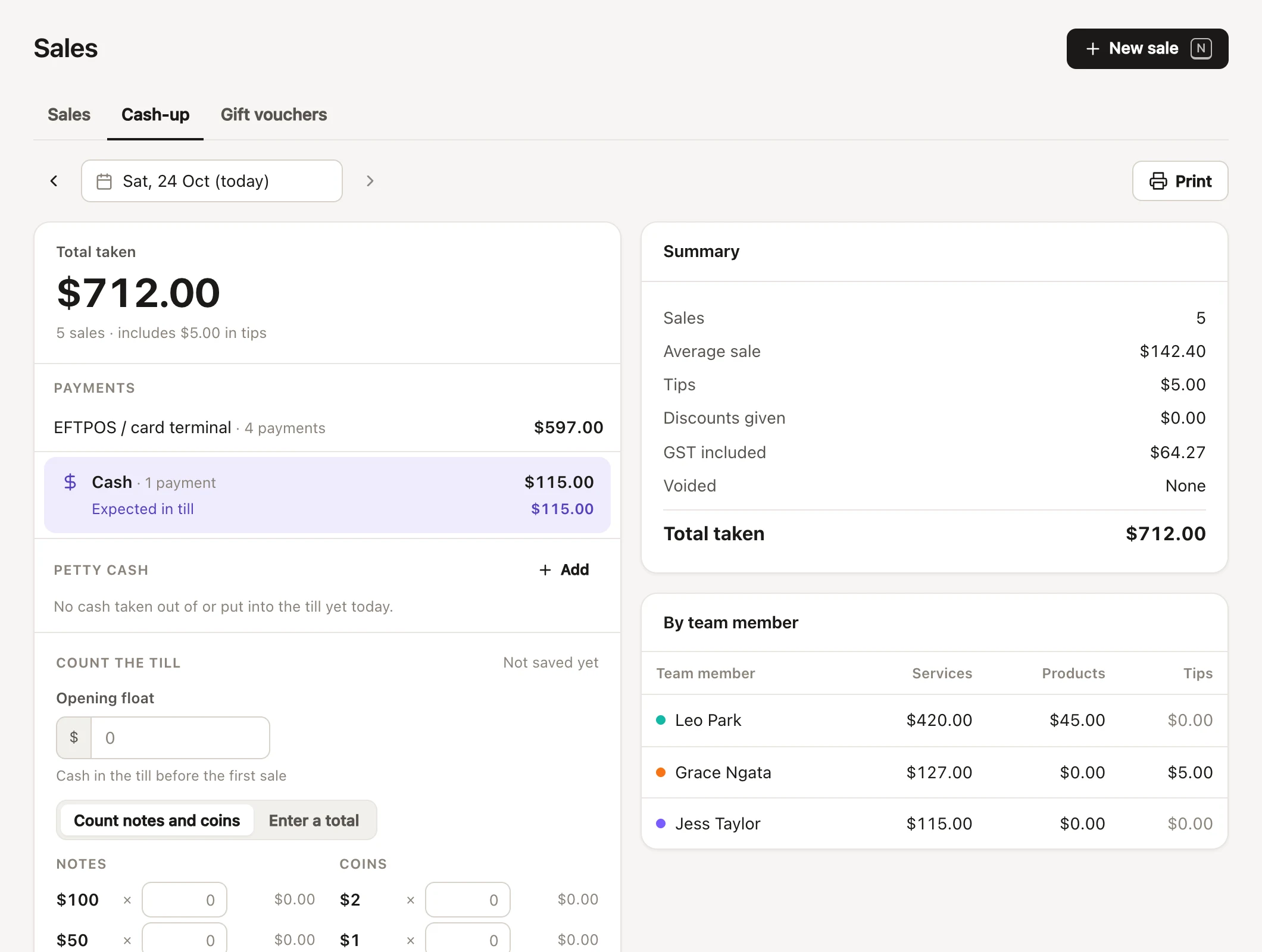
## The day's takings by payment method
The left-hand side starts with **Total taken**: every sale that day, with how many sales and the tips included. Below it, **Payments** lists the money by method (cash, EFTPOS, card, gift voucher, bank transfer, your own payment types), each with how many payments.
**Cash** is highlighted, with **Expected in till** underneath: the opening float, plus cash taken, less petty cash paid out, plus petty cash put in.
Cash taken includes cash deposits put on clients' accounts that day. When account credit was involved, an **Account credit** section explains it:
- **Deposits taken**: already counted in the payments above.
- **Paid with account credit**: paid earlier, so not new money today.
- **Refunded**: credit given back to clients. Cash refunds are in petty cash.
Voided sales aren't counted anywhere in the cash-up.
## Counting the till by notes and coins
1. Check the **Opening float**: the cash in the till before the first sale. It starts as the float from your last cash-up.
2. Choose **Count notes and coins**.
3. Type how many of each note and coin you have. Each line shows its value, and Enter moves to the next.
4. **Counted** adds it all up, float included.
5. Add **Notes** if you like, then press **Save cash-up**.
In Australia that's $100, $50, $20, $10 and $5 notes, and $2, $1, 50c, 20c, 10c and 5c coins. FullColumn shows the notes and coins for your currency.
## Entering a till total instead
If you'd rather count another way, choose **Enter a total** and type the **Counted cash**: everything in the till, float included. Then press **Save cash-up**. Salons whose currency has no notes and coins list only see this option.
## Checking the till balances
As soon as there's a count, FullColumn compares it with **Expected in till**:
- **Spot on – the till balances.**
- **Over by $5.00.** More cash than expected.
- **Short by $5.00.** Less cash than expected.
Before you save a short or over count, check for cash paid out that isn't in petty cash (milk money, a cash refund), and a cash payment entered as EFTPOS at checkout. Record anything taken out of the till in [petty cash](https://docs.fullcolumn.com/sales/petty-cash), so the till still balances.
## Saving and changing a cash-up
**Save cash-up** keeps the count with the float, the cash expected, your notes and your name ("Saved by Mia · 5:42 pm"). You can change it and **Save changes** again that day; **Undo changes** goes back to what was saved.
- A count you haven't saved is kept on that device, so moving away doesn't lose it ("Unsaved changes").
- If a sale or petty cash changes after you've saved, the cash-up says so ("Cash taken has changed since this was saved") until you save again.
- If someone else saves the same day's cash-up on another device first, you're asked to reload and see their count before saving yours.
Changing an earlier day's saved cash-up needs **See reports for the whole salon**. On a shared [Front desk device](https://docs.fullcolumn.com/team/shared-devices), press **Unlock to change an earlier day** and give your password.
## The cash-up summary and team takings
The right-hand side has the day's **Summary**: **Sales**, **Average sale**, **Tips**, **Discounts given**, GST included (or added), **Voided** and **Total taken**.
**By team member** splits each person's services, products and tips. Without **See reports for the whole salon**, it shows **Your takings** only.
**Recent cash-ups** lists your last 14 cash-ups, each with who counted, the amount and **Balanced**, **Over** or **Short**. Tap one to open that day.
## Printing the cash-up
Press **Print** at the top for a paper copy of the day: takings, payments, petty cash, the count and the summary.
## Who can cash up the till
Cashing up needs **Cash up the till**. Everyone has it to start with, including on a shared Front desk device; take it away from anyone who shouldn't ([roles and permissions](https://docs.fullcolumn.com/team/roles-and-permissions)). Owners have every permission. Changing an earlier day's count also needs **See reports for the whole salon**.
## Common questions
### Do card payments need counting?
No. Only cash is counted. The other methods are listed so you can check them against your EFTPOS terminal's end-of-day total and Stripe.
### Can I cash up yesterday if we forgot?
Yes. Step back to yesterday and count as usual. Once a day has a saved cash-up, changing it later needs **See reports for the whole salon**.
### We take the float out each night. What do I put as the opening float?
What was in the till when you opened. The next day starts with the same float, and you can change it.
### Can two people cash up the same day?
There's one cash-up a day. Whoever saves last is shown as the one who saved it, and FullColumn won't let one device save over another's count without seeing it first.